JAVA Development
Java technology functions as both a platform and a programming language. High-level object-oriented language Java has a specific syntax and structure. A Java platform is a specific setting where Java programming language programs can be used. Java platforms are divided into four editions, Java Standard Edition (Java SE), Java Enterprise Edition (Java EE), Java Micro Edition (Java ME), and JavaFX.
What are the Various Types of Java?
The Four Types of Java:
Java Standard Edition (Java SE),
Java Enterprise Edition (Java EE), and
Java Micro Edition (Java ME).
JavaFX
Java Platform, Standard Edition (Java SE)
The Java SE Platform Includes:
JVM (Java Virtual Machine),
JDK (Java Development Kit),
JRE (Java Run-time Environment), and
Various class libraries.
Java Platform, Enterprise Edition (Java EE)
The most used features of Java EE are:
Java Server Pages (JSP): It is a server-side programming language that allows constructing dynamic, device-independent ways to build web-based applications.
Java Server Faces (JSF): The JSF API offers elements such as inputText, commandButtons, and others and assists in managing their states. Additionally, it offers data translation, server-side validation, etc.
Java Persistence API (JPA): Java developers get access to an object/relational mapping mechanism through the Java Persistence API to manage relational data in Java applications.
Enterprise Java Beans (EJB): EJB is one of the many Java APIs used for developing corporate applications. It is a server-side software component that defines an application's business logic.
Java Platform, Micro Edition (Java ME)
Java Micro Edition was developed to facilitate mobile and embedded device applications.
Some examples of Java ME applications are given below:
Calculator for Mobile, which demonstrates the functionality of multi-threading.
GPIO (General Purpose Input Output) applications.
Location APIs, etc.
Types of application using java.
J2SE
Standlone Application using (swing,awt,JAVAFx)
Client Server Application using Socket Programming. (java.net package)
J2EE (ADAVANCE JAVA)
Web Application (Assess from any browser) [servlet/jsp/filter/FLEX/tag] library can build.
Enterprise and Distributed Application ( different java server talk to each other with EJB)
Interoperable Application. (different server java and other language server talk to each other with JSON,XML. (by using core java JAX-RPC,JAX-WS,JAX-RS)
Advance Java.
Browsers communicate with servers using the HTTP protocol. The browser sends HTTP data to the server. The Java server converts that data into JavaBeans and sends it to a servlet. The servlet then saves it into the database using JDBC.
Web applications are divided into three parts: Model, View, and Controller.
View (Presentation Layer): This includes HTML (structure), CSS (style), and JavaScript (browser-side validation). It also uses JSP, FLEX, and tag libraries.
Controller Layer: This layer reads data from the view. It uses servlets, JSP, filters, and tag libraries to read data. Frameworks like Struts, JSF, and Spring MVC can also be used.
Model Layer: This is divided into two layers:
Business Layer: Applies business logic using Java, JTX (Java Transaction), security, Spring TX, Spring Security, and EJB.
DAO (Data Access Object) Layer: Saves data into the database. DAO classes interact with the database using JDBC, Hibernate, and JPA.
Let's discuss the DAO (Data Access Object) part.
JDBC [ Java Database Connectivity ]
a standard Java API, part of the Java Standard Edition, that enables Java applications to interact with relational databases.
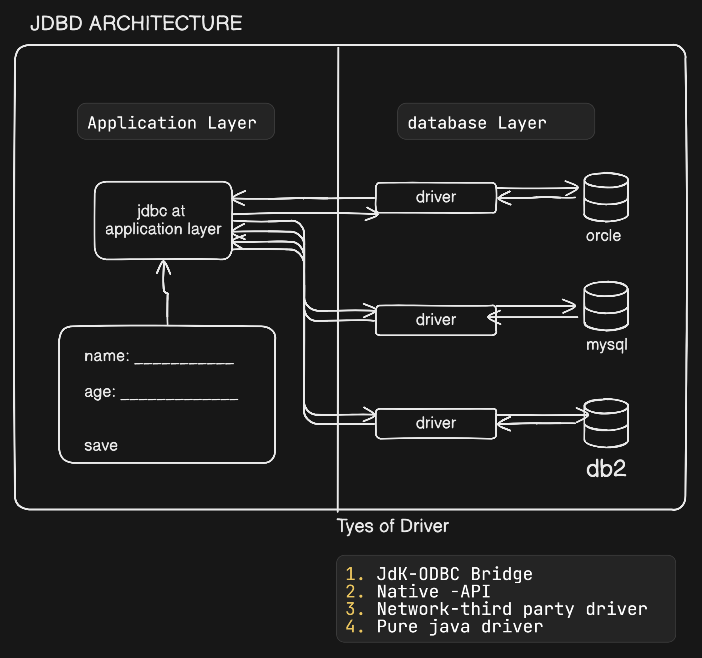
TYPES OF DRIVER
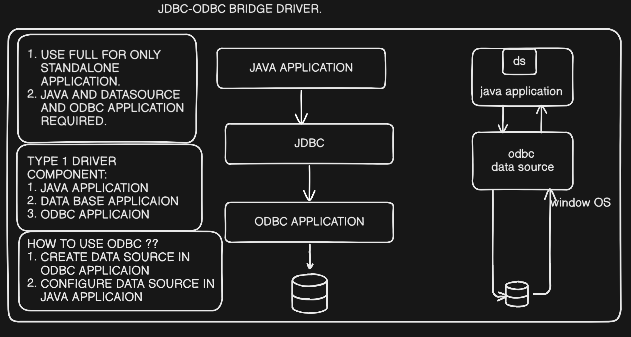
JDBC-ODBC Bridge (OPEN DATABASE CONNETIVITY CALL): EXTRA SOFWARE REQUIRED. WINDOWS GIVES BY DEFAULT.
Native -API :
Network-third party driver
Pure java driver
JDBC-ODBC BRIDGE DRIVER.
By default come with java verson 1.7.x . don’t use double translation required.
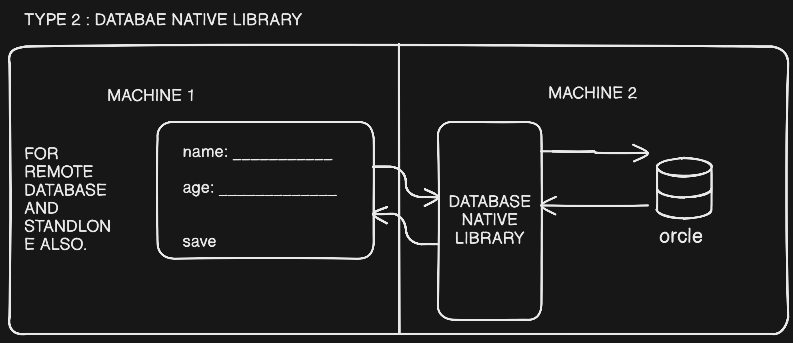
Native Driver [type 2 driver]
[ JAVA APPLICAION ] ——> [ JDBC ] ——> [ DRIVER (DB VENDOR) ] ——> [DATABASE ]
- Step 1: JDBC Call
- The application calls the JDBC API.
- Step 2: Driver Translation
- The Type 2 driver translates the JDBC method into Oracle's native OCI (Oracle Call Interface) function calls.
- Step 3: Native Library Execution
- The native library (oci.dll on Windows or .so on Linux) communicates with the database server.
- Step 4: Result Returned
- The database returns data → native library → JDBC driver → Java application.
# direct call to database with the help of Call Level Interface (CLI).
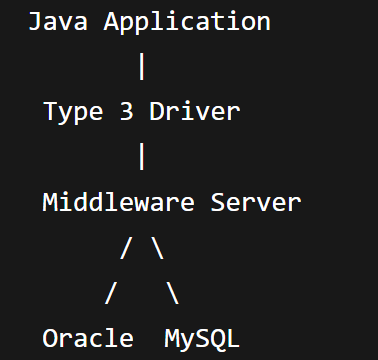
Third Party Driver(Network Protocol Driver) [type 3 driver]
Pure Java Driver
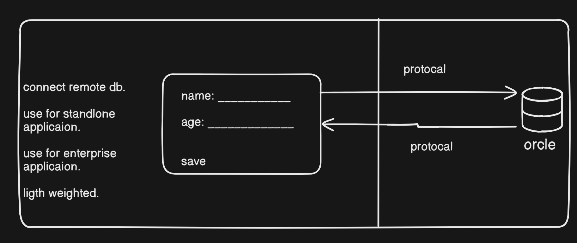
database vendor protocal specific jar required. protocal through they connect is called thin protocal. by using RMI [REMOTE METHOD INVOCATION]
SOME IMPORTANT INTERFACE AND CLASSE.
DriverManager(Class): [1] to register driver [2] to get connection
Driver(Interface): every db vendor must need to implement Driver Interface.
Connection(Interface): use to get connection from database.
Statment(Interface): usefull to pass SQL statement to database.
SQLException (Class) : usefull to understand database level exception.
Steps to Connect database:
load driver implementation into JVM.
using 3 way load driver.
class.forName(“Driver.Implemented.class);
DriverManager.registerDriver(driver interface).
using system property from the command line interface.
`java -D driver = driver.implementation.class appName
get Connection.
3 way to get connection from db.
DriverManager.geConnection(“url”)
DriverManager.geConnection(“url”,”username”,”passwrod”);
DriverManager.geConnection(“url”, Property property)
create statement:
using statement.
statement st = con.createState();
using prepared statement.
preparedStatement pst = con.preparedStatment(“sql”);
using callable statement.
CallableStatement cs = con.callableStatement();
execute SQL Statements;
using statement
st.execute(DDL); create,alter,drop,truncate,rename table;
st.executeUpdate(DML); insert,update,delete record;
st.executeQuery(DRL); select records;
using prepared Statement
same as upper. no need to pass sql qurey in method.
using callable statement.

